
Life360: Family Safety & GPS
What Life360 is
Whether at home, online, or on the move, our comprehensive family safety features bring peace of mind to your loved ones AND help safeguard your personal belongings.
The sentence of its App Store description that best says what it is, picked by Jev. The developer's own words.Whether at home, online, or on the move, our comprehensive family safety features bring peace of mind to your loved ones AND help safeguard your personal belongings. Experience location safety features that surpass ordinary GPS tracking apps. More than just a GPS location tracker, with Life360, finding friends and family has never been easier.
In addition to focusing on safety, Life360 allows you to effortlessly keep tabs on your pets, keys, wallet, phone, and other essentials using Tile Bluetooth trackers and the NEW Life360 Pet GPS. These trackers integrate with your Life360 map, ensuring you can easily locate everything and everyone that matters most from a single, convenient platform.
Life360 memberships include essential safety features like:
- SOS Alerts: Send silent alerts with your precise location to friends, family members, emergency contacts, and responders.
- 24/7 Emergency Dispatch: We're here for your loved ones, always ready to respond, even when you can't make the call.
- Identity Theft Protection: Safeguard sensitive digital information for each family member, backed by a white-glove restoration service.
- Roadside Assistance: Free towing, jumpstarts, tire changes, lockout assistance, refueling and more.
Download the free app now to access Advanced Location Sharing, Location History, Crash Detection, and Place Alerts. Keep tabs on your family members as they come and go from key locations like home, school and work.
Take your safety to the next level by upgrading to one of our premium Life360 memberships. Choose the plan that suits your friend's and family's unique needs and enjoy a 7-day free trial.
Life360 Silver - Simplify your safety with features such as:
- 2 Places with unlimited Alerts
- 2 days of Location History
- Crash Detection
- Family Driving Summary
- Data Breach Alerts
- SOS Help Alerts During Emergencies
Life360 Gold* - Keep your family secure on the go with all the features of Life360 Silver, plus:
- 30 days of Location History
- Unlimited Place Alerts
- Individual Driver Reports
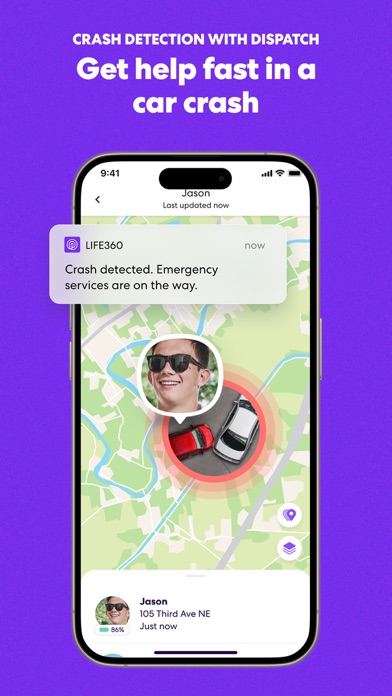
- Crash Detection with emergency dispatch and live agent support
- 24/7 Roadside Assistance
- $250 in Stolen Phone Protection
- ID Theft Protection and Data Breach Alerts
- $25,000 in Stolen Fund Reimbursement
Life360 Platinum* - Prepare for anything, anywhere, with all the features of Life360 Gold, plus:
- $1 million in Stolen Fund Reimbursement
- 50 miles of Free towing
- $500 in Stolen Phone Protection
- Travel Support with Disaster Assistance
- Medical Support
https://www.life360.com/privacy_policy/
https://www.life360.com/terms_of_use/
Explanation for App Permissions [Optional Permissions]
• Camera: App accesses user’s camera to allow users to take photos or videos on the app.
• Location: App accesses location information to allow users to share location information to other Circle members.
• Microphone: App accesses microphone to allow users to record and share voice memos.
• Music and audio: App accesses music and audio to play music and audio.
• Nearby devices: App accesses nearby devices to find, connect to and determine the relative position of nearby devices by using Bluetooth.
• Notifications: App accesses notification to send notification to users.
• Phone: App accesses user’s phone to allow users to make phone calls on the app
• Photos and videos: App accesses photos and videos to allow users to view photos and videos on the app.
• Physical activity: App accesses physical activities to calculate and detect driving events, such as driving speed, use of breaks, and accident detection.
You may still use the app even if you withhold optional permissions. However, app features requiring permission may not be available in such cases.
What people say
Within crashes and bugs, Life360's trouble is mostly location: tracking that stops or lags, and the map showing people in the wrong place.
Written by an LLM from the lead report's counts.Read the reportBefore you install Life360
Written reviews run 0.8 stars lower than the store score.
Store ratings count every star tap; written reviews come from people with something to say, so they usually run lower. Read the shares below as what reviewers raise, not the chance it happens to you.
Reviewers who value an app that works reliably praise it, 6% of written reviews, and some also like that it is easy to use. Skip it if crashes and bugs bother you: 11% of written reviews raise them, and pricing and fees come up in 7%.
Of the people who wrote a review
Watch out for
- Crashes and bugs11%Most often tracking stops or lags
“fix this please!! i click on the app, and then it immediately shuts down. it’s unusable right now.”
- Pricing and fees7%
- Performance and battery5%
Share of written reviews that raise each one.
Who it suits
- Friends47 reviewers; most raised: crashes and bugsComplain25%Praise92%
- Gaming2 reviewersComplain0%Praise100%
- Work1 reviewerComplain0%Praise100%



What Life360 reviewers say
One public report on Life360: Family Safety & GPS reads 3,000 App Store and Google Play reviews from the last year. The report “Life360 reviews: location accuracy, battery and the subscription” was last updated Oct 28, 2026. Of its 3,000 judged reviewers, 38% complain, 75% praise something, 5% make a request, 1% say they're quitting and 1% cancelled a paid plan. The top complaint is crashes and bugs at 28% of complaints, then pricing and fees (17%) and performance and battery (13%). Top praise: works reliably, at 6% of praise. Top requests: new feature or option (61%) and bring something back (14%). Two audience differences stand out. New user: say they're quitting 11.3x as often as everyone (12% vs 1%). 1 star: mention privacy and notifications 2.1x as often as everyone (20% vs 9%).
One public report on Life360: Family Safety & GPS. Each title is written by the person who shared it; the line under it says how the reviews were picked.
Made with OneStar's App Store and Google Play review analyzer. Run one on your own app or a competitor's, free with no card.