
Microsoft Outlook
What Microsoft Outlook is
Outlook lets you bring all your email accounts and calendars in one convenient spot.
The sentence of its App Store description that best says what it is, picked by Jev. The developer's own words.Outlook lets you bring all your email accounts and calendars in one convenient spot. Whether it’s staying on top of your inbox or scheduling the next big thing, we make it easy to be your most productive, organised and connected self.
Here's what you'll love about Outlook for iOS:
- Focus on the right things with our smart inbox - we help you sort between messages you need to act on straight away and everything else.
- Swipe to quickly schedule, delete and archive messages.
- Share your meeting availability with just a tap and easily find times to meet with others.
- Find everything you're looking for, including files, contacts, and your forthcoming trips.
- View and attach any file from your email, OneDrive, Dropbox, and more, without having to download them to your phone.
- Open Word, Excel, or PowerPoint attachments to edit them directly in the corresponding app and attach them back to an email.
- Recap extra-long email threads in an instant with Summarise with Copilot*
- Type a few words to have Copilot* jump-start your writing with an outline or draft
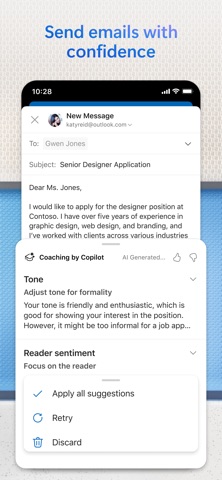
- Before sending off your email, use Coaching with Copilot* to get tips and suggestions that help improve the overall tone, sentiment, and clarity
*Microsoft 365 Personal/Family subscription or business account enabled with Copilot required to use Copilot features
--
Outlook for iOS works with Microsoft Exchange, Office 365, Outlook.com (including Hotmail and MSN), Gmail, Yahoo Email, and iCloud.
--
To make an in-app purchase of a Microsoft 365 Family or Personal subscription, open the app, go to Settings, and tap on Upgrade next to your Outlook.com or Hotmail.com account. Subscriptions begin at $6.99 a month in the US, and can vary by region. With a Microsoft 365 subscription, you get 1TB of storage for each user, access to all features in Word, Excel, and PowerPoint on iPad, iPhone, and iPod touch, and you can install Word, Excel, PowerPoint, Outlook and OneNote on PCs or Macs.
Microsoft 365 subscriptions purchased from the app will be charged to your iTunes account and will automatically renew within 24 hours prior to the end of the current subscription period, unless auto-renewal is disabled beforehand. To manage your subscriptions or to disable auto-renewal, after purchase, go to your iTunes account settings. A subscription cannot be cancelled during the active subscription period. Any unused portion of a free trial period, if offered will be forfeited when the user purchases a subscription to that publication, where applicable.
Privacy and Cookies: https://go.microsoft.com/fwlink/?LinkId=521839
Terms of Use: http://go.microsoft.com/fwlink/?LinkID=530144
Contract Summary: https://www.microsoft.com/microsoft-365/outlook/contract-summary
Consumer Health Data Privacy Policy: https://go.microsoft.com/fwlink/?linkid=2259814
What people say
Outlook's crash complaints come down mostly to the app closing or failing to open, often after an update, with mail not loading a distant second.
Written by an LLM from the lead report's counts.Read the reportBefore you install Microsoft Outlook
Written reviews run 0.8 stars lower than the store score.
Store ratings count every star tap; written reviews come from people with something to say, so they usually run lower. Read the shares below as what reviewers raise, not the chance it happens to you.
Of the people who wrote a review
Watch out for
- Crashes and bugs17%Most often crashes on launch
“the last update has the makes my app crash each time I try to open it. it was working fine before... I use a Redmi pro”
- Login and account6%
- Sync and data loss3%
Share of written reviews that raise each one.
Who it suits
- Work170 reviewers; most raised: crashes and bugsComplain33%Praise72%
- School or study56 reviewers; most raised: hard to use or clutteredComplain23%Praise82%
- Personal life22 reviewers; most raised: login and accountComplain36%Praise87%



What Microsoft Outlook reviewers say
One public report on Microsoft Outlook reads 2,862 App Store and Google Play reviews from the last year. The report “What people complain about and love in 2026” was last updated Oct 23, 2026. Of its 2,862 judged reviewers, 45% complain, 61% praise something, 7% make a request and 1% say they're quitting. The top complaint is crashes and bugs at 34% of complaints, then missing feature (20%) and login and account (11%). Top praise: easy to use, at 28% of praise. Top requests: new feature or option (70%) and bring something back (17%). Two audience differences stand out. 4 stars: mention missing feature 2.2x as often as everyone (48% vs 22%). United Kingdom: mention bad update or redesign 2.2x as often as everyone (10% vs 5%).
One public report on Microsoft Outlook. Each title is written by the person who shared it; the line under it says how the reviews were picked.
Made with OneStar's App Store and Google Play review analyzer. Run one on your own app or a competitor's, free with no card.